HTML
what is mean html ?
html stands for hyper text markup language
Chapter 1 Structure
In all kinds of documents, structure is very important in helping readers to understand the messages you are trying to convey and to navigate around the document
#### and it work like Pages have a different type of structure to be written, but most of them have little in common. Web pages or paper pages share the same structure
### Elements HTML
- Tags
- Attributes
- dir=””
- align=””
- Body Head and Tittle
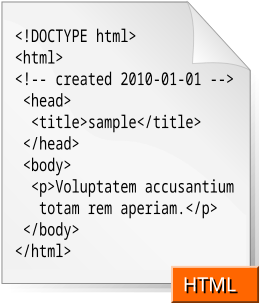
## Chapter 8 Extra Markup ### Since the web was first created, there have been several different versions of HTML. The latest version is html 5
In each release there are some improvements and new tags, but not available for everyone, this depends on the type of laptop used and the version installed on the laptop
- DOCTYPEs
- Because there have been several versions of HTML, each web page should begin with a DOCTYPE declaration to tell a browser which version of HTML the page is using (although browsers usually display the page even if it is not included),the use of a DOCTYPE can also help the browser to render a page correctly.
-
Comment in HTML *If you want to add a comment to your code that will not be visible in the user’s browser, you can add the text between these characters:
- ID Attribute
- Every HTML element can carry the id attribute. It is used to uniquely identify that element from other elements on the page. Its value should start with a letter or an underscore (not a number or any other character).It is important that no two elements on the same page have the same value for their idattributes So you can edit it in the css screen
- Class Attribute
- Every HTML element can also carry a class attribute. Sometimes, rather than uniquely identifying one element within a document, you will want a way to identify several elements as being different from the other elements on the page So you can edit it in the css
- Block Elements
- Some elements will always appear to start on a new line in the browser window.for example <p>

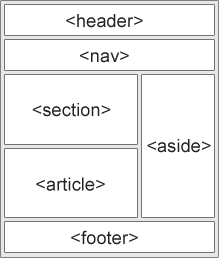
## Chapter 17 HTML5 Layout ###HTML5 introduces a new set of elements that allow you to divide up the parts of a page. The names of these elements indicate the kind of content you will find in them. They are still subject to change, but that has not stopped many web page authors using them already
Traditional how you can do HTML Layouts
its amke it easyer contoll how you want your structure to look like !!
### done by suzan amer